More than 780 accounts restored

LinkedIn account restricted

LinkedIn restricted your account? A real person takes your case from here.

Verified your ID and still restricted? LinkedIn lets you appeal each decision only once. A person writes that appeal, or the letter after it, then every route your case allows, from a formal letter to LinkedIn to an email to the executive team. 780 accounts back since 2021, on every platform we cover.

Only LinkedIn can lift a restriction, and anyone who asks for your login or promises an unban is running a scam. We do neither. A person reads your notice and writes every letter, and you send each one yourself, from your own email.

Get My LinkedIn Appeal Written

Your first letter within 24 hours of your finished questionnaire, or a full refund.

or check your case for free, no card needed

  • Letters in English, replies read in any language.
  • LinkedIn's rules on file, re-checked 18 November 2026.

LinkedIn account permanently restricted

You did everything LinkedIn asked. It still says “will remain restricted”.

Most restricted members go round the same loop. Every step below is LinkedIn’s own.

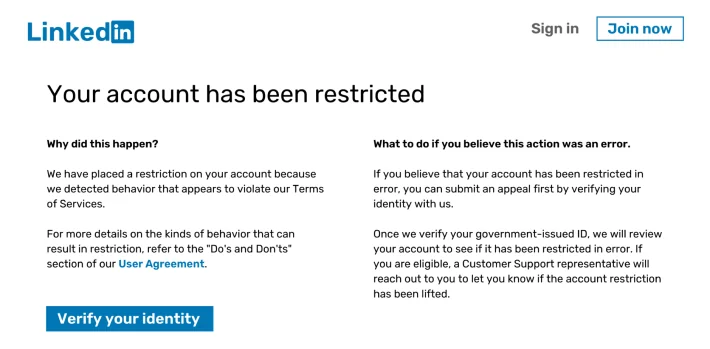
  1. 1Restricted

    LinkedIn’s sign-in screen: Your account has been restricted. We have placed a restriction on your account because we detected behavior that appears to violate our Terms of Services. If you believe your account has been restricted in error, you can submit an appeal first by verifying your identity with us. Once we verify your government-issued ID, we will review your account. A button: Verify your identity.
    The appeal starts with your ID.
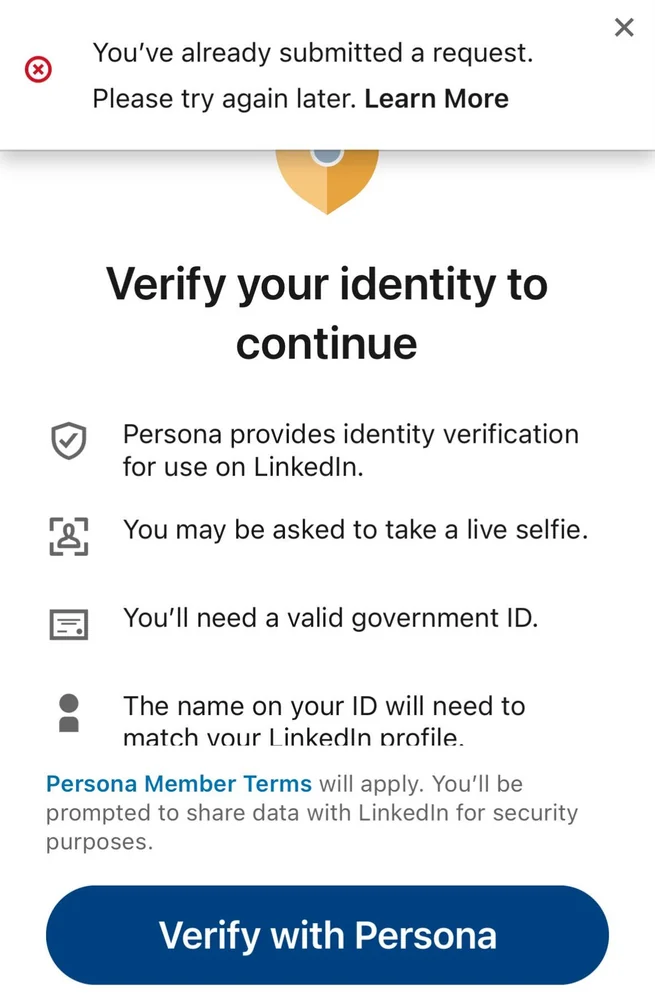
  2. 2The ID check

    LinkedIn’s “Verify your identity to continue” screen, run by Persona, with an error across the top: You’ve already submitted a request. Please try again later. The screen lists: you may be asked to take a live selfie, you’ll need a valid government ID, and the name on your ID will need to match your LinkedIn profile.
    Try again, and it says you already did.
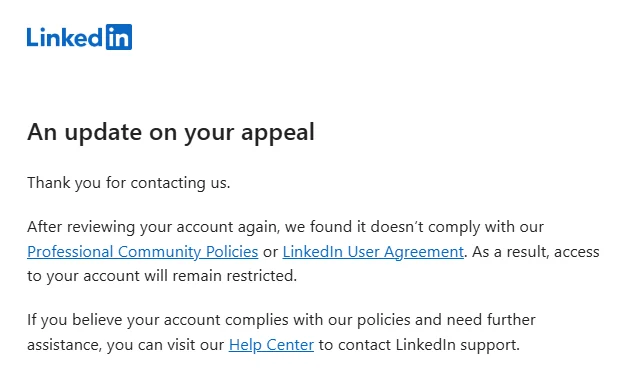
  3. 3The answer

    LinkedIn’s email, An update on your appeal: Thank you for contacting us. After reviewing your account again, we found it doesn’t comply with our Professional Community Policies or LinkedIn User Agreement. As a result, access to your account will remain restricted.
    After the ID: “will remain restricted”.
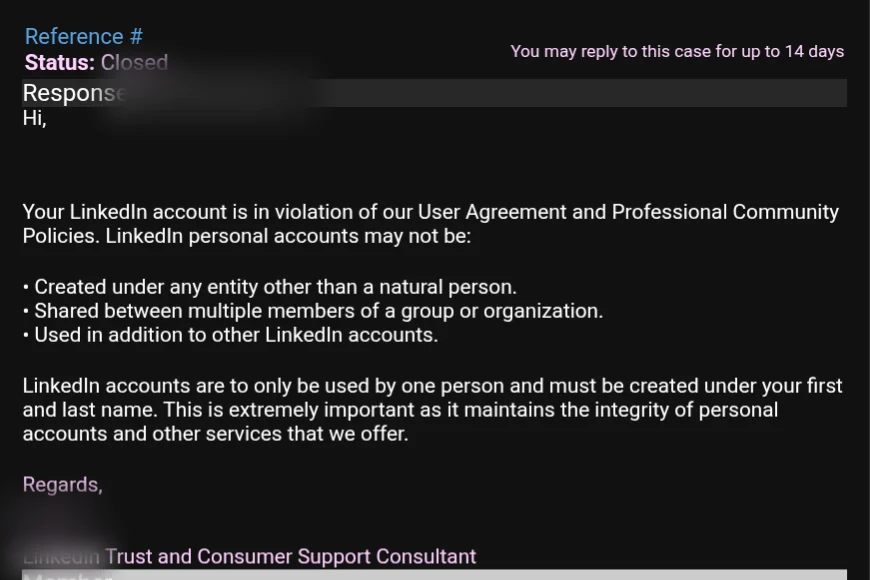
  4. 4Case closed

    A LinkedIn support case, its reference, date and the agent’s name hidden: Status: Closed. You may reply to this case for up to 14 days. Your LinkedIn account is in violation of our User Agreement and Professional Community Policies. Signed by a LinkedIn Trust and Consumer Support Consultant.
    Support’s reply, then “Status: Closed”.

And back to step 1

Owlibi is independent from the platforms it covers and is not affiliated with or endorsed by them.

  • Messaged LinkedIn’s help account on X, and heard nothing for weeks.
  • Wrote in from another email, and were told to write from the account’s own.
  • Opened a new account, and watched it get restricted the same day.

In their own words

  • “I completed identity verification using my passport and received an email saying I violated policies and that the account will remain restricted.”

    June 2026

  • “No matter how hard you explain, you’ll just get the same old “permanently restricted” answer.”

    June 2025

  • “I’m in the middle of my job search, and this account and my connections are really important to me right now.”

    June 2026

Posted publicly by LinkedIn members on Reddit. Names left out. Not an Owlibi case.

None of that was a mistake.

But every step went back to the same queue, and LinkedIn reviews each decision only once. What was missing is a person to write your case, and the routes past that queue.

It happened to us first.

I lost my first account when I was a kid. Lineage 2, banned overnight. My English was poor, there was no AI to help, and nobody online had answers. So I wrote to them. Then again, and again, in every way I could find. Most of it went unanswered. It came back anyway, because I didn't stop.

The founder of Owlibi

Read the founder’s story
LinkedIn account restricted: what to do

LinkedIn appeal denied? Your case has more routes than the verify button.

LinkedIn reviews each decision once, and for most people the ID check is where that review goes. The routes after it reach people outside the support queue: a formal letter to LinkedIn, a request for the data held on your account, a review by an independent dispute body, a complaint to a consumer authority where it applies, and an email to the executive team. We prepare every one your case allows, in order, each with where and how to send it. Our guide on what to do when your appeal is rejected walks through each move after a no.

  • “Will remain restricted” is LinkedIn’s answer to one appeal. It isn’t the end of your case.
  • The data request asks LinkedIn for what it holds on your account, and it can show the data behind the restriction. One member who sent one posted that LinkedIn answered the same day.
  • The data request also asks whether a machine made the decision, and for a person to look again.
  • Each route comes with where to send it, how, and what to keep, and its waiting period goes in your dashboard.

Your routes, in the order your case needs them

  1. Your appealFirst letter

    LinkedIn’s appeal form, or its hacked-account report.

  2. A formal letter to LinkedIn

    To its legal team, with 30 days to answer.

  3. A request for your account’s data

    It can show the data behind the restriction.

  4. An independent dispute body

    An outside review of LinkedIn’s decision.

  5. A consumer authorityWhere it applies

    A complaint where your country has one that applies.

  6. The executive team

    An email to the people above the queue.

Each route waits its own time for an answer, and your dashboard keeps every date.

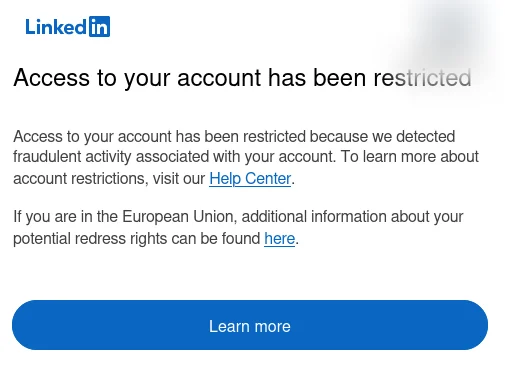
LinkedIn’s notice: Access to your account has been restricted because we detected fraudulent activity associated with your account. If you are in the European Union, additional information about your potential redress rights can be found here. A Learn more button. The member’s photo is hidden.
LinkedIn’s notice points EU members to their redress rights.

LinkedIn appeal

Your LinkedIn appeal, written by a person who read your notice.

LinkedIn’s appeal form asks six things: whether your profile name matches your ID, whether you were travelling, a VPN, your country, recent profile edits, and why it should look again. A person reads your notice, what you sent and what came back, then answers each one with facts LinkedIn can check. Never a template, and never an apology for something you didn’t do. Already used your appeal? Then your first letter is the first route after it, written the same way. Our guide to how to write a ban appeal covers what goes in one, and what stays out.

  • What if your profile says “Sam” and your passport says “Samuel”? LinkedIn’s form asks why the names differ. Your letter explains it before the mismatch costs you the review.
  • You don’t need to send more documents. You need the right facts in the right box.
  • A person reads your notice. Then what you sent, and what came back. Only then is a word written.
  • The ID step is planned too: what LinkedIn’s check asks for, and in Canada, the EU and the UK, LinkedIn’s notarized Affidavit of Identity if you’d rather not send an ID.

Example, with an invented case

LinkedIn’s appeal form, answered

Does the name of your LinkedIn Profile match the name on your Photo ID?
No. The first name on my profile is my nickname.
Are you currently traveling/have you accessed your account from another country?
Yes. A work trip to Lisbon, 2 to 6 March.
Have you created/accessed your account through a VPN or Proxy Server?
Yes. My employer’s VPN, on my work laptop.
Please specify your current location/country.
United Kingdom
Did you make recent updates to your profile after creating it?
Yes. A new job title on 1 March.

If you believe your account has been restricted incorrectly, tell us why we need to relook at our decision.

I am writing about the restriction placed on my account on 6 March 2026, which cites behavior that appears to violate the Terms of Service.

Your notice

From 2 to 6 March I worked from Lisbon on my employer’s VPN, and on 1 March I updated my job title after a promotion. These sign-ins were mine, from a new country and a company network.

Your answers

My profile name, Sam, is the short form of Samuel, the name on my passport, which I verified with Persona on 7 March.

Your ID check

I ask you to review the restriction and restore my access to the account I have used for my work since 2014.

Samuel Reyes

Your full name, typed

An example appeal, with an invented case.

Why is my LinkedIn account restricted?

No reason given, the ID loop, a hack or a flagged tool: your letters fit your case.

LinkedIn’s notice names a policy, not what happened. Your letters start from the words on your notice and what you tell us, so they answer the restriction you actually have.

  • You assume it was something you did. Restrictions also come the week an account opens, or after a sign-in from somewhere new.
  • They said securing your account would fix it. Then came a restriction “for violation of their policies”.
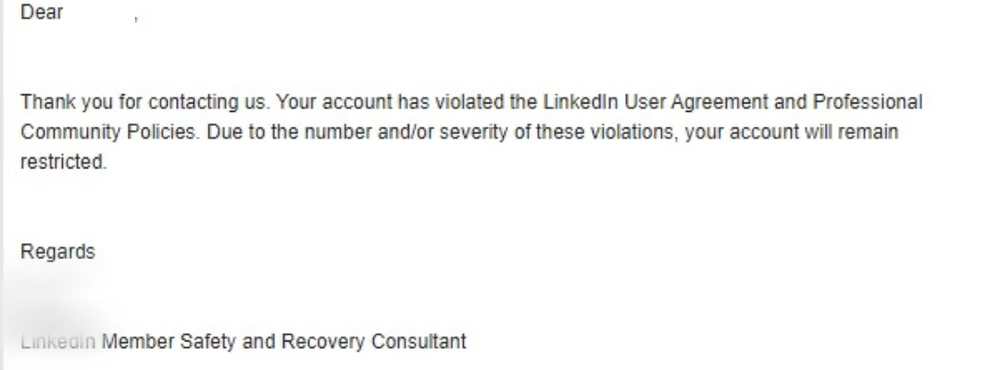
A LinkedIn support reply, the agent’s name hidden: Thank you for contacting us. Your account has violated the LinkedIn User Agreement and Professional Community Policies. Due to the number and/or severity of these violations, your account will remain restricted. Signed by a LinkedIn Member Safety and Recovery Consultant.
LinkedIn’s reply names a policy, not what you did.
  • LinkedIn account restricted for no reason

    “behavior that appears to violate our Terms of Service”

    Your appeal answers that line with facts LinkedIn can check, and the data request asks for the data behind it.

  • Verified, and still restricted

    “will remain restricted”

    Stop resending the same ID. Your case moves on to a letter that asks LinkedIn to answer, and the routes after it.

  • LinkedIn account hacked, then restricted

    “temporarily restricted as a precaution”

    Your first letter is LinkedIn’s hacked-account report: every change the attacker made, and a request for your account and your profile as it was. Taken over but not restricted? Same case, same price.

  • Flagged for a tool or too many invitations

    “automate activity on LinkedIn’s website”

    Yes, in most cases, we take these. Your letter owns what happened, shows it has stopped, and asks for your account back. Never a denial.

A brand-new account restricted before you used it, or a lock that lifts on a set date? Check it for free first.

Ordering for a parent? A son or daughter can, when the account owner agrees and sends each letter themselves.

Safe, and in your hands

Get your LinkedIn case handled without giving anyone your password.

You keep your login, your ID and every decision. We never sign in, never pose as you, never claim a contact inside LinkedIn, and never promise the account comes back. Every letter sits in your dashboard: you read it, you send it, you see what’s next.

  • “DM me, I got mine back” is how the help threads fill with people who want your login. We never ask for it, and we never message you first on Instagram, Telegram or WhatsApp.
  • One price for the whole case. No per-letter fees. Then your case starts.
  • Never your password, never your ID, never a second account.

We never

  • Ask for your password or a login code
  • Ask for your ID or a selfie
  • Sign in to your account
  • Contact LinkedIn about your case
  • Claim a contact inside LinkedIn

You always

  • Keep your password and your account
  • Read every letter before it goes
  • Send every letter yourself
  • Pay one price for the whole case

“You will keep your password a secret”

LinkedIn’s User Agreement, section 2.2, “Your Account”. Effective 3 November 2025.

Your options, side by side

  • On your own

    Who writes it
    You, between everything else
    Your login
    Stays yours
    When LinkedIn says no
    Start again
    Price
    Free, and your time
  • A stranger who says “DM me”

    Who writes it
    Unknown
    Your login
    Often asked for
    When LinkedIn says no
    Silence
    Price
    Paid up front
  • A one-submission appeal service

    Who writes it
    A person, once
    Your login
    Stays yours
    When LinkedIn says no
    Depends on the package
    Price
    A fee for what the package covers
  • Owlibi

    Who writes it
    A person, every letter
    Your login
    Stays yours, never asked for
    When LinkedIn says no
    The next route, already planned
    Price
    One price for the whole case

How long does a LinkedIn restriction last?

Know your next step and its date, so your job search doesn’t wait on a ticket.

LinkedIn sets its own pace: its precaution screen promises contact within 48 hours, and members report days, or months. Your first letter is ready within 24 hours of your finished questionnaire, whatever LinkedIn’s pace. Then your dashboard shows one next step at a time, with its date. Send us LinkedIn’s reply: we read it, choose the next route, and prepare the next letter.

  • Did you know a closed LinkedIn case takes replies for only 14 days? Your dashboard keeps that date.
  • One next step at a time, each with its date.
  • Avoid the move that slows a case down: a new ticket on top of the old one. Your reply goes in the thread you already have.
  • Plus: LinkedIn’s replies are read for you in any language. Your letters are written in English.
Owlibi's case dashboard for a test case, under Right now: while you wait for an answer to your appeal, we're preparing your next step. Your next letter is being checked; we'll email you when it's ready, and the card shows the latest day it reaches you.
The real dashboard, shown with a test case.

How your case runs

  1. Day 0

    You answer the questionnaire.

  2. Within 24 hours

    Your first letter, after your finished questionnaire, with where and how to send it.

  3. When you’re ready

    You send it, from your own email.

  4. When LinkedIn replies

    You add the reply; we read it and choose the next route.

  5. Each route

    Its own wait, its date in your dashboard.

LinkedIn appeal service price

One price for your whole LinkedIn case. Never per letter.

Pick by what your LinkedIn is to you. You see your exact price before you pay.

  • Personal

    €149

    Personal profile that earns nothing.

    Your profile: your job search and your network.

    Once, for the whole case. Set it beside years of connections and recommendations you can’t rebuild, applications that ask for your profile link, and the Premium some keep paying while they can’t log in.

  • Creator

    €449

    Monetised account under 10,000 followers.

    On LinkedIn, an account you earn through, from clients, leads or placements, is a monetised account.

    If one client, one placement or one deal a month comes through your LinkedIn, one month locked out costs more than the whole case.

Every price includes

  • Every letter your case needs, with instructions for where and how to send it
  • A review of every reply you share
  • Waiting periods tracked until each route in your case is done, as long as you stay in touch
  • A person writes every letter, and we check it before you get it
  • A re-open for 12 months after purchase if your case closed without your account back and something changes

Bigger than that?

Over 10,000 followers, a company page, or a Sales Navigator or Recruiter team: check your case for free first, and we send you a quote.

Our 24-hour guarantee

  • Your first letter arrives within 24 hours of your finished questionnaire.
  • If we're late, you get a full refund, and we still finish your case.

The clock pauses while a question we sent you waits for your answer.

Get My LinkedIn Appeal Written

Prices are in euros and include any VAT.

LinkedIn restricted my account

Every question, answered straight.

About your LinkedIn, about LinkedIn’s own steps, and about us.

How do I unrestrict my LinkedIn account?

Sign in and follow LinkedIn’s prompt: usually it asks you to verify your identity, and that starts your appeal. LinkedIn lets you appeal each decision only once, so the written appeal is worth getting right. If it still says restricted after that, the routes after the appeal are your next step.

Why did LinkedIn restrict my account?

LinkedIn’s notice names a policy, not what happened: “behavior that appears to violate our Terms of Service”, “fraudulent activity”, a suspected takeover, or automated activity. A request for the data held on your account can show the data behind it, and your appeal answers the line on your notice with facts LinkedIn can check.

How long does it take LinkedIn to unrestrict an account?

LinkedIn sets its own pace. Its precaution screen promises contact within 48 hours, and members report anything from days to months. Your first letter is ready within 24 hours of your finished questionnaire, and each route after it has its own wait, which your dashboard tracks.

Where is LinkedIn’s appeal form?

LinkedIn has an appeal form for restricted accounts, with six questions: whether your profile name matches your ID, travel, a VPN, your country, recent profile edits, and why it should look again. Hacked accounts have their own report form. Your first letter tells you which one is yours, where it is, and what to write in each box.

How do I contact LinkedIn support about a restricted account?

You reach LinkedIn support about a restricted account through its Help Center: its contact form, its appeal form or its hacked-account report, depending on what happened. If those keep sending the same reply, your case has routes past them. Your sending guide names the exact form or address for each letter, so you never guess which door is yours.

I verified my ID and it’s still restricted. Now what?

Verifying is LinkedIn’s first step, not the whole appeal. If the answer is “will remain restricted”, sending the same ID again won’t change it. Your case moves on to the routes after the appeal, each written by a person, with where and how to send it.

It says “You’ve already submitted a request”. What do I do?

Stop retrying LinkedIn’s ID check: a new attempt doesn’t restart it. Your case moves to the written appeal and, if LinkedIn doesn’t answer or says no, the routes after it.

Can I create a new LinkedIn account after being restricted?

Don’t open a second LinkedIn account. Members report new accounts restricted the same day, and your connections, history and recommendations aren’t on a new one. Owlibi never advises a second account.

Can a permanently restricted LinkedIn account come back?

Some permanently restricted LinkedIn accounts do come back, even after LinkedIn called the restriction final. 780 accounts have come back with Owlibi since 2021, on every platform it covers. Nobody can promise yours, and anyone who does is selling something else.

My LinkedIn was hacked. Is that covered?

Yes, Owlibi covers a hacked LinkedIn account, whether LinkedIn restricted it afterwards or the attacker simply locked you out. After a hack, LinkedIn’s account recovery starts with its hacked-account report. That report is your first letter: every change the attacker made, and a request for your account and your profile as it was. Same case, same price.

I used an automation tool. Can you still help?

Yes, in most cases. Your letter owns what happened, never denies it. We all make mistakes, and we're here to help you get back to LinkedIn.

My posts stopped reaching anyone, or LinkedIn limited one feature. Is that a case?

Yes. A hidden LinkedIn profile, a warning or a limited feature is a case too, at the same price. A lock that lifts on a set date, or a brand-new account restricted before you used it: check it for free first.

Do you need my LinkedIn password or my ID?

Never. Owlibi doesn’t ask for your password or your ID, and never signs in. LinkedIn may ask you for an ID through Persona, its own provider: Owlibi tells you how to pass that step.

I don’t want to give LinkedIn my ID. Is there another way?

In Canada, the EU and the UK, LinkedIn accepts a notarized Affidavit of Identity instead. Elsewhere the ID is LinkedIn’s condition, and whether to send it is your call. LinkedIn says that, if you agree, it receives a redacted copy showing only your full name and face, and that the data is generally deleted within 14 days.

I’m still paying for Premium. Should I keep it, or buy it for faster help?

If you bought LinkedIn Premium through Apple or Google, that store manages the subscription. Members who pay for Premium report the same queue as everyone else, and none of Owlibi’s routes needs it.

Is this a scam? How are you different from the people in the threads offering help?

Owlibi never asks for your login, never messages you first, and never promises an unban. Every letter is yours to read and send. One price for the whole case.

What if my first letter is late?

You get a full refund, and we still finish your case. Your first letter is due within 24 hours of your finished questionnaire, weekends included.

Why pay, when LinkedIn’s appeal is free?

LinkedIn’s appeal is free, and you can do it yourself. You pay Owlibi for a person who writes it right the one time LinkedIn reviews it, and every route after it, with the dates kept.

I earn through LinkedIn. Is that different?

An account you earn through, from clients, leads or placements, is a monetised account: €449 for the whole case. Over 10,000 followers, a company page, or a Sales Navigator or Recruiter team: the free case check first, and a quote.

Will my connections, posts and recommendations come back?

When LinkedIn lifts a restriction, the account comes back as it was. After a hack, what the attacker deleted may not: your letters ask for your profile as it was, but rebuilding it once you’re back in isn’t part of the case. And if LinkedIn says it’s lifted but you still can’t sign in? Your case stays open until you get back what you asked us for, or until every route is done. If we're waiting on you and hear nothing for 30 days, it closes.

What if LinkedIn restricts it again?

Keep the email LinkedIn sent when it lifted your restriction. Banned again within hours of getting back in, because of a bug or an error on the platform's side? Staff look at it again, at no extra cost, case by case. If your case ends without your account back and something changes within 12 months of your purchase, we re-open it.

Can I order for my mum or dad?

Yes. A son or daughter can order an Owlibi case for a parent, when the parent agrees and sends each letter themselves, from their own email.

Your next step

Two ways this goes from here.

Leave it

“Will remain restricted” stands, and nobody looks at it again. The case closes when its 14 days run out, and every application still asks for a profile link you can’t share.

Start today

Within 24 hours of your finished questionnaire, a person has read your notice and written your first letter, with exactly where to send it. The routes after it are ready if LinkedIn says no again.

Our 24-hour guarantee: from your finished questionnaire to your first letter, or a full refund.

Get My LinkedIn Appeal Written

From €149 for the whole case. You see your exact price before you pay.

Wait, you don't want your free check on your LinkedIn case?

The free case check tells you whether we take your case, what it costs, whether the ban can be appealed, and whether your chances make our service worth it. When they're very low, we say so and don't take it. It takes about 2 minutes, no card needed, and we reply within 24 hours.