A VAC ban is a permanent ban from Valve Anti-Cheat (VAC), the system Valve uses to catch cheats on Steam. It blocks the banned account from VAC servers in the games it covers. Valve says VAC bans can't be appealed. Only a ban that Valve's own re-check finds wrong is removed. Single-player, LAN and offline play still work.
This guide explains what a VAC ban means, what triggers one, what it blocks, how it differs from the other bans on Steam, and what you can still do. Every rule here comes from Valve's own Steam, Counter-Strike 2 and Dota 2 help pages and update notes, as Owlibi last checked them in November 2026.
What does a VAC ban mean?
A VAC ban means Valve Anti-Cheat found a cheat linked to your Steam account, and the account is now banned from VAC servers in the affected games. VAC is short for Valve Anti-Cheat. Valve says the system is "designed to detect cheats installed on users' computers."
Three points in Valve's rules matter most:
- The ban sits on the account, whoever was playing. Valve says: "Any bans added to an account will remain regardless of who was using the account at the time the infraction occurred."
- Valve won't say which cheat it found. Valve's "I've been VAC banned" help page says: "We do not disclose the cheats that were detected".
- The ban covers a set of games, not one match. Steam lists the games each ban covers on your account's VAC Status screen.
What triggers a VAC ban?
A VAC ban is triggered when Valve Anti-Cheat finds a cheat on a computer that connects to a VAC-secured server. Valve's VAC page says: "Any third-party modifications to a game designed to give one player an advantage over another is classified as a cheat or hack and will trigger a VAC ban." VAC finds them by their signatures: "The VAC system reliably detects cheats using their cheat signatures."
A cheat for a single-player or offline game doesn't bring a VAC ban. Valve says VAC bans are only issued when software "provides an advantage on VAC-secured servers". Player reports alone don't bring one either: "Users are not VAC banned based on reports alone."
Valve also names two things VAC won't ban you for: changes to your "System hardware configurations" and "Updated system drivers". One exception is on record: in October 2023, Valve began reversing VAC bans for Counter-Strike 2 players affected by "incompatible AMD graphics drivers".
Valve also warns that "Hackers may maliciously disguise their cheats to cause others to get banned." Valve's VAC page asks players to take care with game modifications like scripts or custom skins, and to download custom content only from trusted sources.
Counter-Strike 2 adds its own layers on top of VAC: VACnet and Trusted Mode. More on those in the Counter-Strike 2 section below.
What a VAC ban blocks, and what still works
A VAC ban takes away play on VAC servers in the games it covers, not your whole Steam library. Valve's rules split it like this:
| Blocked | Still works |
|---|---|
| Playing the affected games on VAC servers | Single-player and offline play |
| Sending items, or moving items and games to another account | Receiving items |
| A refund for the game the ban covers | Servers that don't use VAC, where the game has them |
| Sharing that game through Family Sharing | Your other games, outside the ban |
| Gifting that game to another account | Buying and registering new games |
| Uploading to that game's hub, or voting on its Workshop | Local LAN games |
Steam's refund page names VAC directly. Once VAC bans you in a game, you can't get a refund for that game. Valve's help also says a VAC ban stops voting "in Free to Play games and their communities", not only in the banned game.
Which games a VAC ban covers
A VAC ban covers the game it was issued in, and sometimes a group of games on the same engine. Valve's help page names two groups. Cheating in Counter-Strike: Source, Half-Life 2: Deathmatch, Day of Defeat: Source or Team Fortress 2 brings a VAC ban in all four. Cheating in one of seven Gold Source games (Counter-Strike, Counter-Strike: Condition Zero, Ricochet, Day of Defeat, Team Fortress Classic, Half-Life: Deathmatch and Deathmatch Classic) brings one in all seven. Your VAC Status screen lists the games your own ban covers.
Who else a VAC ban can reach
A VAC ban can spread past the account that cheated, in two ways Valve names:
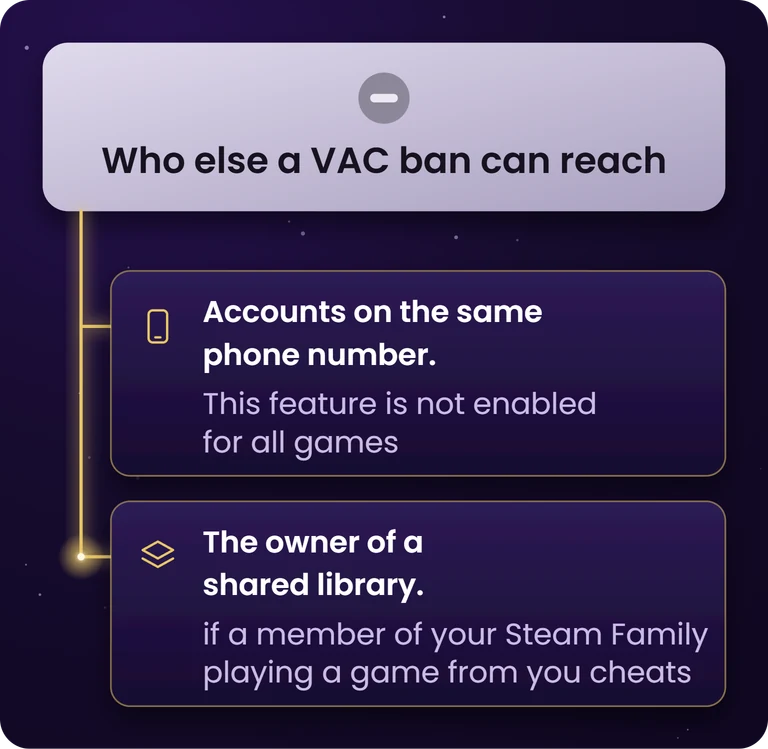
- Accounts on the same phone number. Valve applies a VAC ban to every account that shared the banned account's phone number at the time. That includes an account that doesn't own the game, which then can't buy it. Valve adds: "This feature is not enabled for all games and is used at the discretion of the developer."
- The owner of a shared library. Steam Families has replaced Family Sharing, and Valve's guide to it warns that "your account may also be VAC banned if a member of your Steam Family playing a game from you cheats or commits fraud." Valve's VAC page adds that "VAC-banned games cannot be shared between accounts."
Is a VAC ban a hardware ban?
No, a VAC ban is not a hardware ban. Valve's rules describe VAC bans on accounts: the banned account and, in some games, other accounts on the same phone number. They don't describe a ban on the computer itself.
Some other games do ban the computer, not only the account. Our guide to how HWID bans work in other games covers those.
VAC ban vs game ban vs other Steam bans
A VAC ban is one of several bans and penalties on Steam. Each has its own owner and its own door, so the first step is knowing which one you have.
| Type | Who sets it | How long | Where it goes |
|---|---|---|---|
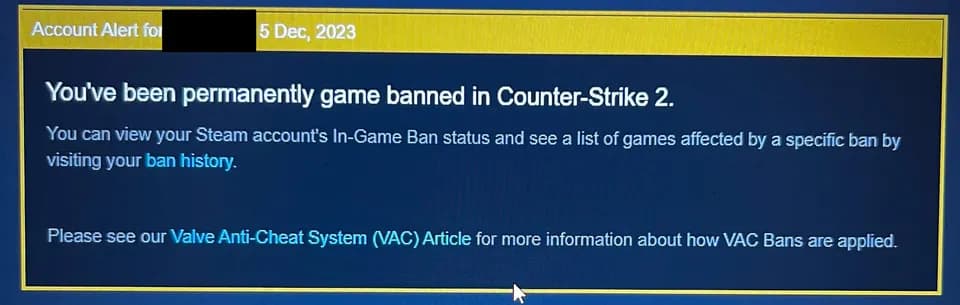
| VAC ban | Valve's anti-cheat | Permanent | No appeal. Valve removes a wrong one itself |
| Game ban | The game's developer. Valve only enforces it | Temporary or permanent | The developer, through the game's Support option in your Steam Library |
| Steam account restriction (community ban, trade ban or a lock) | Valve | Most community bans expire; most trade bans are permanent; a lock's notice says what it restricts | A Steam Support ticket. Valve says Steam Support "cannot modify trading or Community Market restrictions" |
| Server ban | One server's owner, or a tool like Steambans or Punkbuster | Up to the owner | That server's owner. Valve says "we cannot assist you" |
| Counter-Strike 2 cooldown or Dota 2 Low Priority | The game's matchmaking | From 30 minutes to 180 days, or until you win enough games | Can't be removed |
A game ban differs from a VAC ban in who decides. Valve's words: "The game developer is solely responsible for the decision to apply a game ban. Valve only enforces the game ban." Counter-Strike 2 and Dota 2 are run by Valve, so their game bans come from Valve too.
In games Valve doesn't run, the game ban decision belongs to the game's own company: Bohemia for DayZ, Facepunch for Rust, Amazon Games for Lost Ark and Behaviour for Dead by Daylight. Owlibi has a page for each: DayZ ban appeals, Rust ban appeals, Lost Ark ban appeals and Dead by Daylight ban appeals. For any other game, start with Owlibi's game ban appeal service.
How long does a VAC ban last?
A VAC ban lasts forever. Valve's help page says "VAC bans are permanent, non-negotiable, and cannot be removed by Steam Support." The one exception is Valve's own: a ban "issued incorrectly" is "automatically removed after investigation". A VAC ban doesn't go away with time, and there's no end date to wait for.
The timed penalties on Steam are something else. Counter-Strike 2's competitive cooldowns run in steps, and Dota 2's Low Priority ends after a set number of wins. Neither one is a VAC ban.
Can a VAC ban be removed?
No, a VAC ban can't be appealed. Valve's "I've been VAC banned" help page answers it plainly: "No. VAC bans cannot be appealed." Steam Support doesn't remove VAC bans by hand, for any reason. Valve's page names no time limit, so a VAC ban from 10 years ago is still permanent and still can't be appealed.
Only Valve can remove a VAC ban, and only when it finds the ban was wrong. Valve's Counter-Strike 2 update notes record three reversals of wrong VAC bans: on 19 October 2023 (the AMD driver bans), on 8 December 2025 ("The bans will be removed.") and on 22 January 2026 ("Those bans have been reversed."). Each one came as a single line in a game update.
Valve's Counter-Strike 2 help says that when an automated cooldown or ban was issued incorrectly, "it will automatically be rolled back by our servers".
Two things make it worse with Steam Support:
- Saying someone else was playing. The ban stays "regardless of who was using the account".
- Bending the facts. Valve can restrict every account you own for "deliberately submitting false information to Steam Support".
How to check if your VAC ban is still active
You can tell if your Steam account is VAC banned from its VAC Status. In the Steam app, open the Steam menu, then Settings, then the Account tab, and select "Click here for details" under VAC Status to see the games your VAC ban covers. A VAC ban stays active until Valve removes it, so a ban listed there is still in force.
Two more things about who can see a ban:
- Game bans on your profile. Valve's game ban page says "Only permanent game bans are displayed on the user's profile." Temporary game bans and suspensions don't show.
- Your cheating ban status is public. Steam's privacy policy says anyone who looks up your Steam ID through the Steamworks API can see "whether you have received a ban for cheating in a multiplayer game".
VAC bans in Counter-Strike 2
VAC is Counter-Strike 2's anti-cheat, and Counter-Strike 2 adds two layers of its own:
- VACnet watches for irregular gameplay and gives competitive cooldowns. Valve says "players who receive a VACNet cooldown will have their CSR adjusted".
- Trusted Mode is on for everyone. In Valve's words: "Trusted mode in Counter-Strike 2 blocks third-party files from interacting with the game and is enabled by default for all Counter-Strike 2 players."
A VAC ban in Counter-Strike 2 also reaches its items. Valve's trading help says that once a VAC ban, a cooldown or an Overwatch ban is on your account, "you will no longer have access to the CS2 store, or be able to make trades for CS2 items, and you will no longer receive item drops."
In Counter-Strike 2, a player flagged for irregular gameplay is disconnected and gets "a minimum one day competitive cooldown", which blocks all game modes. Everyone in that player's party gets the same cooldown.
VAC Live in Counter-Strike 2
VAC Live is the name players use for the live bans Valve added to Counter-Strike in June 2023. Valve's update notes of 6 June 2023 say: "VAC will now live ban and gracefully terminate the match at the end of the round (unless it was the last round and the cheater lost)." Valve's own help pages don't use the name VAC Live.
Cooldowns aren't bans, but they can't be removed
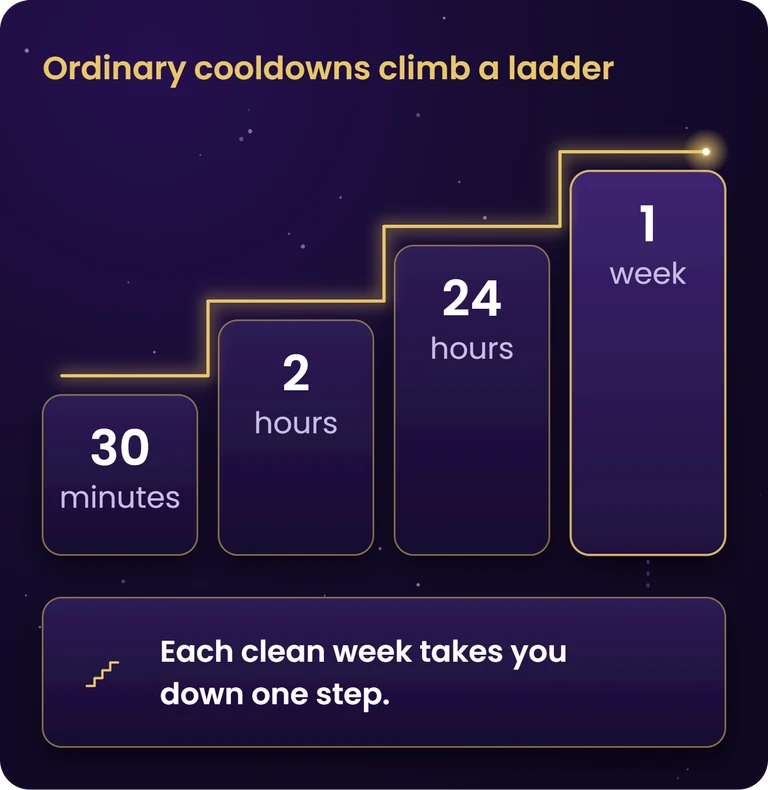
Counter-Strike 2's ordinary cooldowns climb a ladder, per Valve's cooldowns FAQ: 30 minutes, then 2 hours, then 24 hours, then 1 week. Each clean week takes you down one step. VACNet's cooldowns for irregular gameplay run on their own scale. Valve's FAQ, as last edited on 21 October 2026, says they are "always for a minimum of 20 hours" and that later ones "may last up to six months (180 days)". Valve gives cooldowns "regardless of whether or not an infraction was intentional", network faults included. And Valve is clear: "Regardless of the reason a Competitive cooldown was issued they cannot be removed from an account."
Counter-Strike 2 game bans
Valve gives Counter-Strike 2 game bans for cheating, for manipulating a matchmaking rank, for "Botting and/or automation" and for "Intentionally interfering with the normal operation of game servers or other players". Valve's FAQ says: "Counter-Strike 2 game bans are permanent, non-negotiable, and cannot be removed by Steam Support." It also says: "We do not disclose the reason for your game ban."
If Valve banned your Counter-Strike 2 account, our Counter-Strike 2 ban appeal service shows the routes a case can still take.
VAC bans in Dota 2
Dota 2 also lists VAC as its anti-cheat, and the same Steam rules apply. A Dota 2 VAC ban has no appeal form, and only Valve's own review corrects a wrong one.
Not every Dota 2 penalty is a VAC ban, though:
- Low Priority. "Winning the specified number of games is the only way to remove the Low Priority penalty." Steam Support "does not modify or remove these penalties under any circumstance." At the maximum five-game penalty, Valve adds a matchmaking ban.
- Group play. Joining a group with a Low Priority player puts the whole group in the Low Priority queue.
- Game bans. Valve bans shared and smurf accounts, and in serious cases the linked main account too.
- Replay reviews. Dota 2's Overwatch system has players review replays of reported games for griefing and cheating.
- The February 2023 ban wave. In a post that month, Valve said it gave more than 40,000 permanent bans to accounts that read a hidden section of the game's data, one that normal play never reads.
Other Dota 2 game bans go to Steam Support, through Dota 2's page on the Steam help site, signed in with the banned account. Our Dota 2 ban appeal help covers these bans.
What to do if you're VAC banned
After a VAC ban, start with what the ban covers, not with a ticket. These steps keep your options open.
- Check your VAC Status. Note which games the ban covers.
- Save the evidence. Screenshot the ban notice and your VAC Status screen. Note your Steam ID, the game and the date.
- Don't send ticket after ticket. Steam Support doesn't remove VAC bans, whatever the ticket says. If Steam Support already turned a ticket down, Owlibi's guide to what to do when an appeal is rejected explains what's still open.
- Keep to the facts. False information to Steam Support can restrict every account you own. Owlibi's ban appeal letter guide lists what to put in and what to leave out.
- Don't get around the ban. No new account to play around it.
- Keep your login to yourself. Never share a password or a code with anyone who offers to lift a ban.
Owlibi never messages anyone first, and never asks for a password, a code or ID.
Valve's own appeal door is closed for VAC bans, but it's only one route. Owlibi prepares the letters for every other route your case allows, such as a data request to Valve, a dispute body or a consumer authority. A person writes every letter, and you send each one yourself. We don't guarantee unbans.
Not sure what's left? Tell us in the free case check. We answer by email within 24 hours with whether we take your case and what it costs.

Written by
Owlibi
Owlibi is a specialist account appeal service preparing personalised appeals, escalation letters and step-by-step guidance beyond the standard appeal process.
About Owlibi