Facebook account locked? How to tell if you were hacked or banned
Locked, hacked and banned accounts look alike from outside. How to tell which one hit your Facebook or Instagram account, and where each one starts.
Published 9 min read
A locked Facebook account is one you can't get into, and the cause decides your next step. A ban comes with Facebook's own notice, like "Your account has been disabled", and a reason. No notice like that? Then it may not be a ban, and someone else may have got in.
Instagram's bans work the same way. Its suspension screen from January 2026 says "We suspended your account" and counts down "180 days left to appeal". A hack on its own brings no ban screen. Every quote below comes from the platforms' own screens, emails, help pages and rules.
Locked, hacked or banned: the difference at a glance
Locked, hacked and banned accounts look the same from outside: you can't get in. What the platform shows you tells them apart. A banned account gets a notice that names the action and a reason. On Facebook, a locked account gets a message or an email saying it's locked. A hacked account shows changes you didn't make, and on its own brings no ban notice.
| What happened | What you see | Where to start |
|---|---|---|
| Banned: suspended | A notice with a reason, and 180 days to appeal | The platform's appeal, before the days run out |
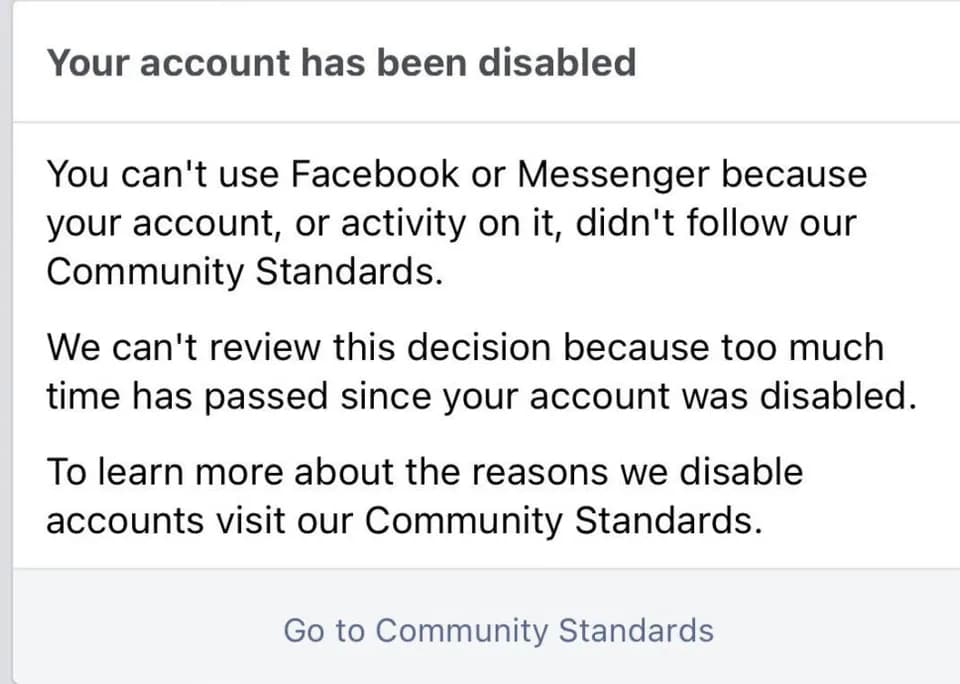
| Banned: disabled | "Your account has been disabled" on Facebook, or "We've disabled your account" on Instagram | The written routes outside the app |
| Locked | On Facebook, a message or email saying the account is locked; no ban notice and no change you didn't make | The steps the platform shows on screen |
| Hacked | No ban notice, but changes you didn't make | The platform's own steps for a hacked account |
| Hacked, then banned | A ban notice for something someone else did | The hacked-account steps first, then the appeal |
How to check which one happened
Three checks tell them apart, and none needs a tool.
- Log in the usual way and read what appears. A ban shows a notice that names it. Anything else on screen isn't a ban notice: follow the steps it gives. If your password no longer works and no notice appears, look at the signs of a hack below.
- Read the emails and texts from the platform. Check the inbox and the phone tied to the account. A ban can arrive by email: one Facebook email says "Your Facebook account has been suspended". A hack can leave alerts about a login or a change you didn't make.
- Ask a friend to look for your profile. A suspended account drops out of sight. Instagram's suspension screen says "Your account is not visible to people on Instagram right now", and Facebook's help center says that when an account is suspended or disabled, "it's not visible to anyone". If your friend sees new posts or messages from you that you didn't send, someone else has been using it.
How to tell your account is banned
A banned account comes with the platform's own notice, in words. Facebook and Instagram both name the action, give a reason and set a clock. These are the signs:
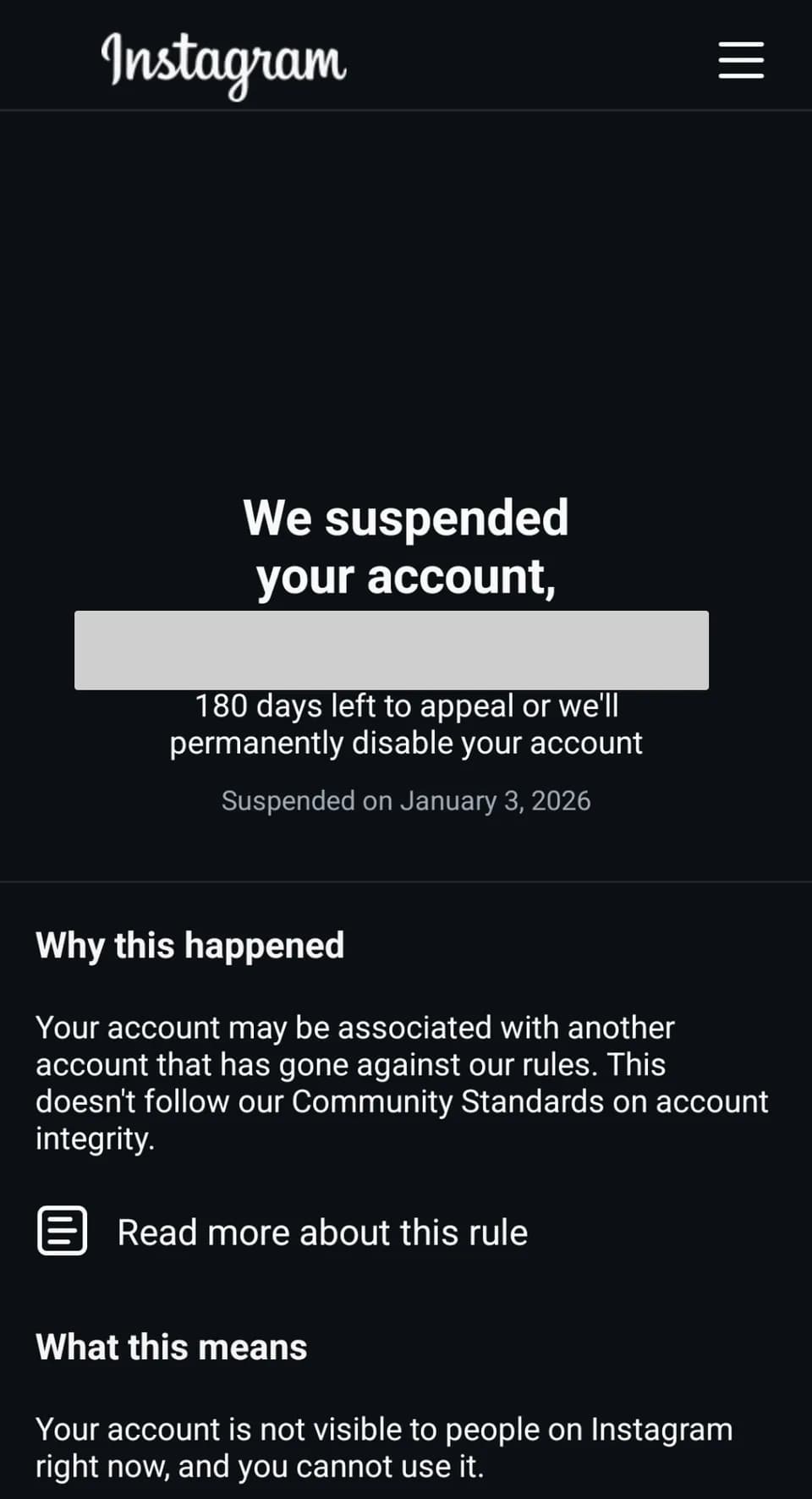
- A headline that names the action. On Facebook: "Your account has been disabled", or an email saying "Your Facebook account has been suspended". On Instagram: "We suspended your account" or "We've disabled your account".
- A reason. Facebook names a rule, for example "account integrity and authentic identity". Instagram explains under "Why this happened" and links to "Read more about this rule".
- A deadline or a button. Facebook's suspension email gives "180 days to appeal our decision" and an "Appeal" button. Instagram's screen counts down "180 days left to appeal or we'll permanently disable your account". Facebook's help center adds that the time to appeal a suspension varies by region.
- It appears once you log in. Instagram's review starts at its login screen, with the account's username and password. Facebook's appeal also sits behind its login. So if your password still works and leads to one of these screens, you're looking at a ban.
What each notice means, and what it still lets you do, is in our guides to what Facebook's disabled and suspended notices mean and Instagram's suspended, disabled and deactivated screens.
A warning often comes first
Instagram's help page on Account Status says that "in most cases, you'll get a warning before losing access to your account." The line is about posts removed again and again for breaking the rules. One Instagram email, with the subject "Important information about your account", says the account "will be suspended soon". Meta's strike rules for Facebook say: "For most violations, your first strike will result in a warning with no further restrictions."
Not every ban waits. Facebook's help center says it may disable an account "without suspending it first, such as in cases of severe or time-sensitive violations." Meta's strike rules say a severe enough violation can disable a Facebook or Instagram account after one occurrence.
Facebook account locked: what it means
A locked Facebook account isn't a banned one. Facebook's help center says that if it sees "unusual activity" on an account, it "might lock your account for security". It tells you by email, or with a message when you log in. With no ban notice, there's nothing to appeal.
A locked account isn't a locked profile either. Facebook's help center calls profile lock "a separate privacy feature": a setting that shows a limited view of your profile to people who aren't your friends.
A lock and a hack can come together. If Facebook locks the account and you also see changes you didn't make, treat it as a hack.
How to know if your Instagram or Facebook is hacked
A hacked Facebook or Instagram account shows changes you didn't make. On its own, a hack brings no notice that the platform acted against you. These are the signs to look for:
- Emails or texts about a login, or a new password, email or phone number, that you didn't ask for.
- An email address or phone number on the account that isn't yours.
- Posts, stories or messages you didn't send.
- Logins you don't recognise in the account's login history.
On Instagram, look for an email from security@mail.instagram.com saying your email address was changed. Instagram's help center says you may be able to undo the change by selecting "secure my account" in that message.
What happens if your Facebook account is hacked?
A hacked Facebook account can be banned for what the intruder did with it. Facebook's disabled screen blames "your account, or activity on it". It doesn't say who was behind the activity.
Other platforms say it outright:
- Steam. Its "I've been VAC banned" FAQ says: "Any bans added to an account will remain regardless of who was using the account at the time the infraction occurred."
- Roblox. Its Terms of Use say: "You are responsible for any actions taken on your Account and on the Services using your access credentials."
A hack is worth reporting to the platform as soon as you find it, since what happens on the account can count against you.
Don't open a new account in the meantime. Instagram's screens list "Creating another account after we've suspended yours" among the things it doesn't allow. Meta's account integrity rules say it may disable accounts made to get around an earlier removal, and accounts owned by the same person as a disabled one.
How do I get my Instagram account back?
How you get your Instagram account back depends on what happened to it:
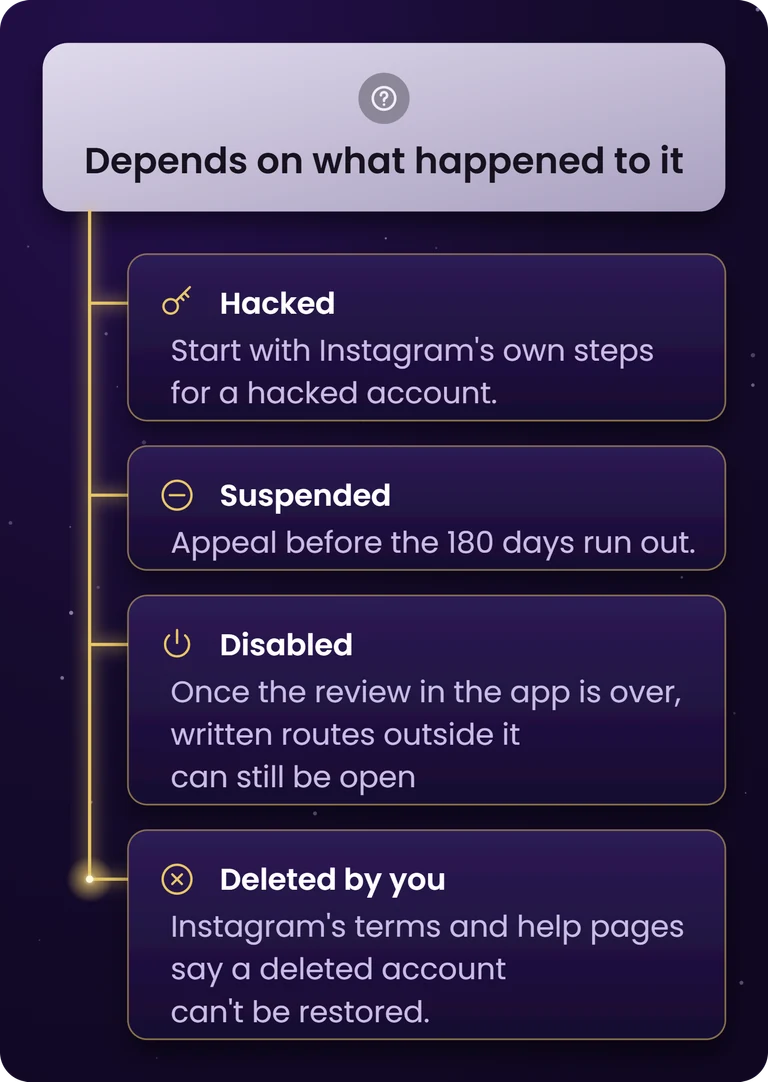
- Hacked. Start with Instagram's own steps for a hacked account.
- Suspended. Appeal before the 180 days run out.
- Disabled. Instagram's screens call this permanent. If your appeal was rejected or ignored, written routes outside the app can still be open, depending on where you live and the kind of account you have.
- Deleted by you. Instagram's help center says that 30 days after you ask to delete a profile, the profile and all its information are permanently deleted. How long you can still cancel the deletion varies by region.
After an appeal, keep trying to log in. People report that Instagram often gives an account back without sending an email first. The usual waits are in our guide to how long Instagram appeals take.
My Instagram was hacked: how do I get it back?
If your Instagram was hacked, getting it back starts with Instagram's own steps for hacked accounts, not with an appeal. An appeal comes in only if Instagram banned the account for what the hacker did. That appeal then sets out what happened, and when, while someone else had the account.
What to do next, for each one
Locked, hacked and banned each start somewhere different.
If someone hacked your account
- Start with the platform's own steps for a hacked account. On Instagram, that's its "My Instagram was Hacked" page. On Facebook, it's the steps headed "What to do if your account has been hacked". Do this before anything else.
- Keep the proof. The alert emails, the changes you didn't make and their dates show what happened while someone else had the account.
- Skip the old email addresses. People report that old Facebook addresses, hacked@fb.com among them, don't work for account cases.
If the platform's own steps don't get you back in, Owlibi can take you on as a paid case, like any ban. We prepare your first letter, the platform's hacked-account report, and then the routes after it. You send each one yourself. We never ask for your password, a code or ID, and we never log in.
If the platform banned the account too, the case covers the ban: your letters set out what happened while someone else had the account.
Once you're back in, turn on two-factor authentication and keep its backup codes where only you can reach them. Never share a code with anyone, Owlibi included.
If the platform banned your account
If your notice gives a deadline, appeal inside it. Facebook's email is plain about it: "If you miss this deadline your account will be permanently disabled."
Owlibi prepares the letters for every route your case allows, for a banned Facebook account or a suspended or disabled Instagram account. You send each letter yourself. We don't guarantee unbans.
If Facebook only locked it
A lock with no hack and no ban needs no appeal: follow the steps Facebook shows on screen. Owlibi never logs in to an account, so unlocking it is between you and Facebook.
Not sure what's left? Tell us in the free case check. We answer by email within 24 hours with whether we take your case and what it costs.
Stay safe while you're locked out
A locked-out account draws strangers who offer to help. Three rules keep you safe:
- Walk away from anyone who wants your password, a login code, or money to "unlock" the account.
- Be wary of support phone numbers. People report that Facebook runs no support phone line, so treat any number that claims to be Facebook support with suspicion.
- Keep the platform's own checks between you and the platform. Facebook or Instagram may ask for a selfie or an ID in their own steps. Only the platform itself gets those.
Owlibi never messages anyone first, and never asks for a password, a code or ID. The full list is in what a ban appeal service does and doesn't do.
Written by
Owlibi
Owlibi is a specialist account appeal service preparing personalised appeals, escalation letters and step-by-step guidance beyond the standard appeal process.
About Owlibi