An Instagram account appeal usually takes just over a day to review, according to the screen Instagram showed after an appeal in July 2025. That is a typical time, not a deadline. The clock that matters more is the 180-day countdown on Instagram's suspension screen. Miss it, or lose the review, and Instagram's screens say the account is disabled for good.
Every quote below comes from Instagram's own screens, emails and help pages, or from Meta's and the Oversight Board's published pages. Where a point comes from people's own reports, it says so.
Instagram appeal times at a glance
Instagram runs several clocks at once, and each one counts something different.
| What you're waiting for | How long | Where it comes from |
|---|---|---|
| Instagram's review of a suspended account | Usually "just over a day" | Instagram's screen after you appeal, dated July 2025 |
| Time left to appeal a suspension | 180 days from the suspension | Instagram's suspension screen, dated January 2026 |
| Time to appeal on some older screens | 30 days | An older Instagram appeal form |
| How long a strike counts against you | One year | Meta's Transparency Center |
| Taking a removed post to the Oversight Board | 15 days from Instagram's decision | Instagram's Help Center |
"Usually" is the key word in the table's first row. Instagram's screen gives a typical time for its review, not a deadline. It doesn't say what happens when a day passes with no answer.
How long Instagram takes to review an appeal
Instagram shows a waiting screen once you appeal a suspended account. It opens with "You submitted an appeal on" and the date, then says: "It usually takes us just over a day to review your information. Check back here." While you wait, your account is hidden from people on Instagram, and you can't use it.
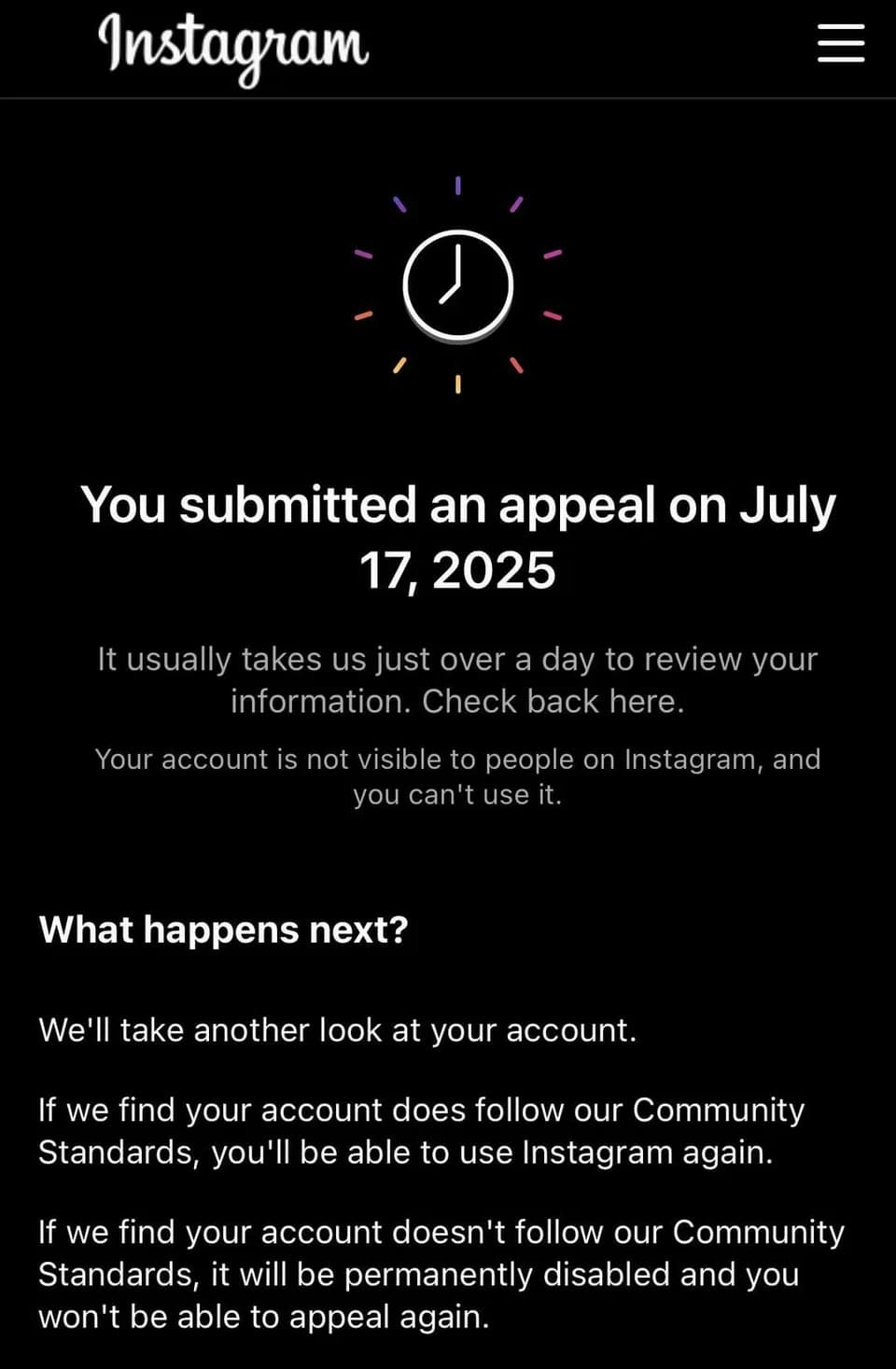
Read the bottom of that screen, not just the timer. If Instagram finds your account doesn't follow its Community Standards, the screen says "it will be permanently disabled and you won't be able to appeal again." By the screen's own words, the review in the app is one try. If you haven't appealed yet, a few days spent on a careful appeal cost little. A rushed, thin appeal can use up your only review. Our guide on how to write a ban appeal covers what to put in yours, and what to leave out.
When Instagram asks for a photo of you
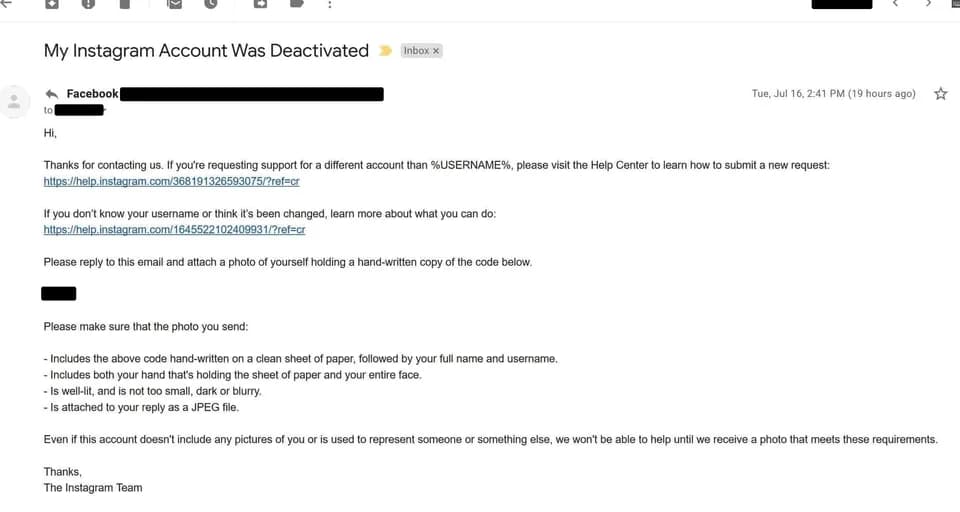
Instagram has replied to some appeals with an email that asks for a photo. One such email, posted in 2019, asks for a photo of you holding a hand-written code, with your full name and username on the same sheet. It ends: "we won't be able to help until we receive a photo that meets these requirements."
Until your photo meets every line of that list, Instagram's review waits on you.
Why is my Instagram appeal taking so long?
Instagram's review screen gives a usual time, "just over a day", but no latest date. An Instagram appeal can take far longer than a day. If Instagram asked you for something, such as a photo, its review waits until what you send meets every line of the request.
People's own posts show how wide the waits run. One person posted Instagram's "You're back on Instagram" email saying the account came back within 3 hours of the appeal. The person who shared the in-review screen on this page wrote that they had been suspended for 4 months.
The clock that matters more: 180 days to appeal a suspension
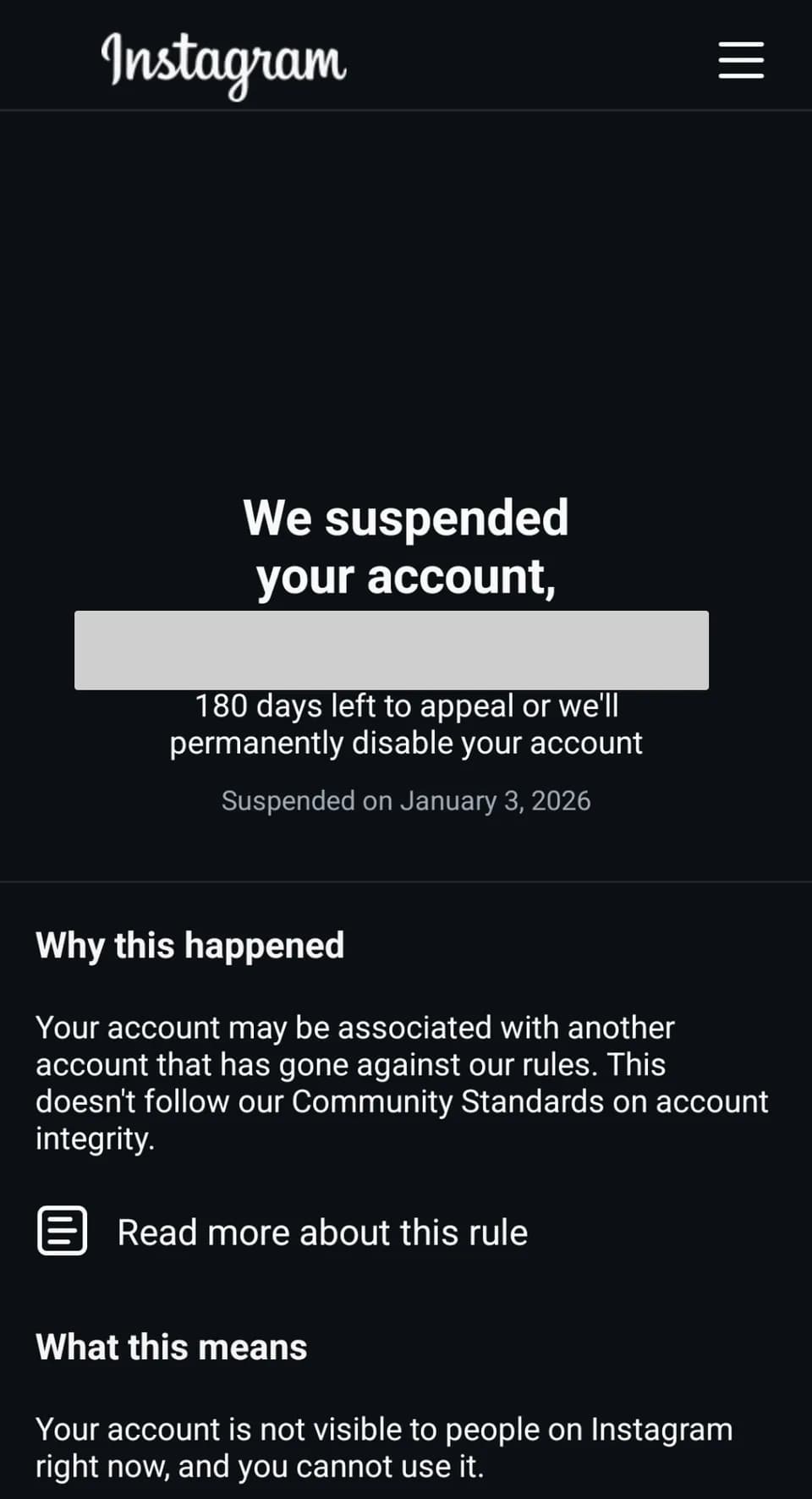
Instagram's suspension screen counts down 180 days. It reads: "180 days left to appeal or we'll permanently disable your account." Under it sit the date of the suspension and a short reason.
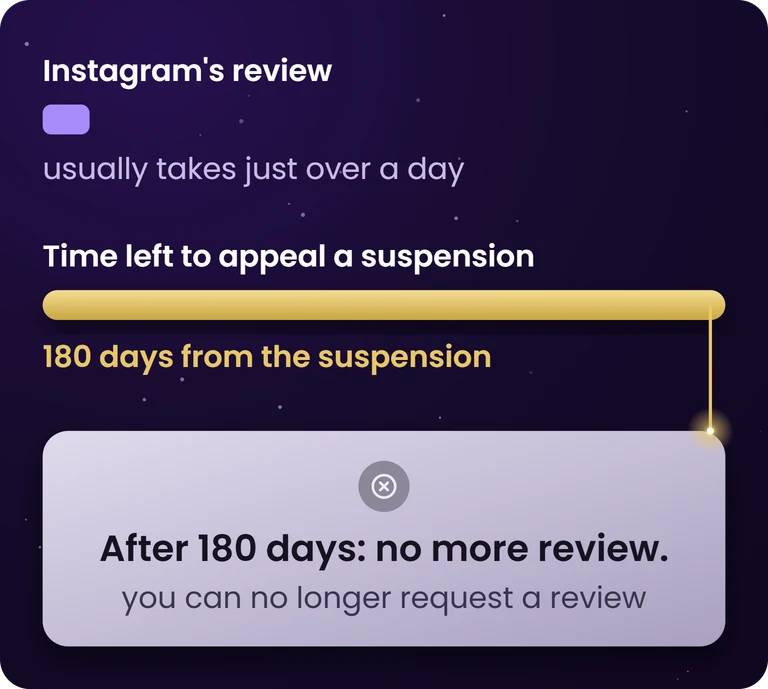
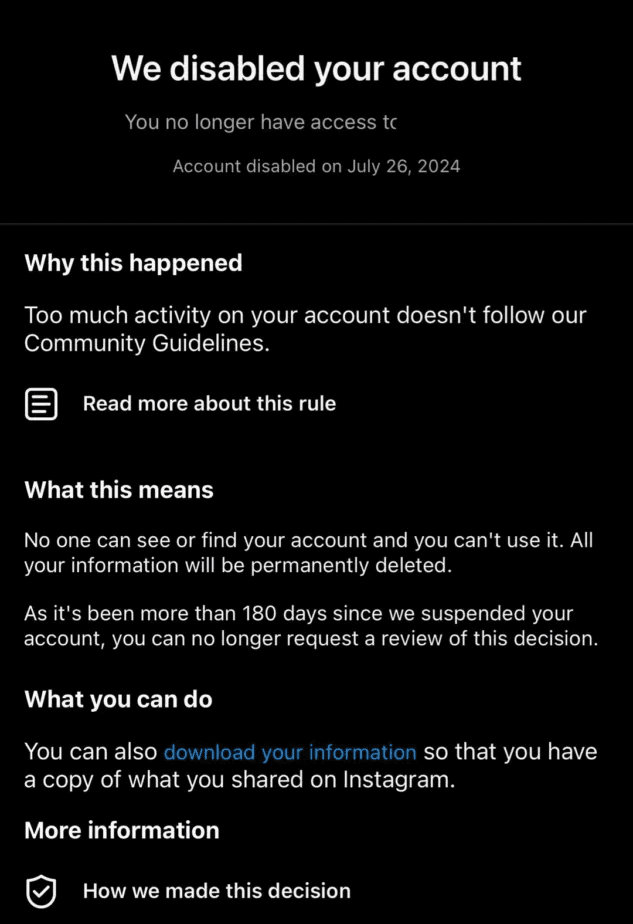
When the 180 days run out, Instagram's screen changes. The disabled screen says that, as more than 180 days have passed since the suspension, "you can no longer request a review of this decision." It adds that all your information will be permanently deleted.
How long does an Instagram suspension last?
An Instagram suspension has no end date on its screen. It lasts until Instagram decides on your appeal, or until the 180 days run out. With no appeal, the countdown ends with the account disabled for good.
Suspended, disabled and deactivated mean different things on Instagram. Our guide to what suspended, disabled and deactivated mean on Instagram covers each one.
Not every screen shows 180 days
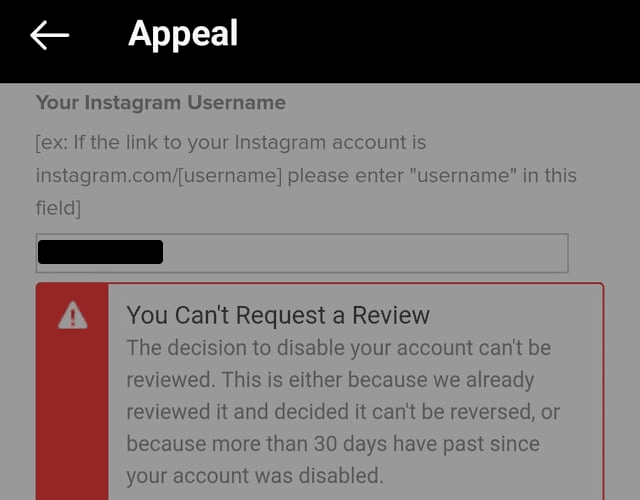
- Older Instagram screens named 30 days. One older appeal form refused a review either because Instagram had already reviewed the account, or because more than 30 days had passed since it was disabled.
- Meta's appeal rules for Facebook accounts give the same 180 days, and say the period varies by region. For Facebook's own notices, read what to do when your Facebook account is disabled.
- Some accounts skip the suspension. Meta's rules disable an account after a single one of the most severe violations, and disable accounts made to get around a ban as soon as Meta finds them.
Removed posts and strikes run on other clocks
Instagram treats a removed post differently from a suspended account. A removed post can bring a strike, and a strike has a clock of its own.
How long a strike counts
Meta counts strikes on Instagram and Facebook alike, and each strike expires after one year. Meta's Transparency Center lists more limits:
- A post older than 90 days earns no strike under most rules. For the most severe ones, the limit is 4 years.
- Several posts removed at once can count as one strike.
- A content appeal that succeeds removes the strike, "so that it won't count against you in the future."
For most violations, Meta's page on disabling accounts says Meta disables an account when someone keeps posting "despite repeated warnings and restrictions."
15 days to take a removed post to the Oversight Board
The Oversight Board can hear an appeal about a removed post, on a short clock. Instagram's Help Center gives 15 days from Instagram's decision. You must have asked Instagram to review the post first, and the Board picks a small number of appeals to hear. To appeal to the Board, your account must still work: the Board's FAQ says it "cannot be disabled".
People can take a decision about a post to the Oversight Board, but not a disabled account. The Board's first case on a permanently disabled account was a pilot that Meta itself sent it, not an appeal from a user. In June 2026 the Board upheld Meta's decision to permanently disable an Instagram account. The decision says that, under its current rules, the Board can't take account complaints as appeals from users.
How to check your Instagram appeal status
Instagram shows where an appeal stands in two places:
- The suspended account itself. Log in with the account's username and password. While the appeal is under review, the screen shows the date you appealed.
- Your email. Check your inbox and your spam folder. Instagram's email for a reversed ban has the subject line "You're back on Instagram" and a button to log back in.
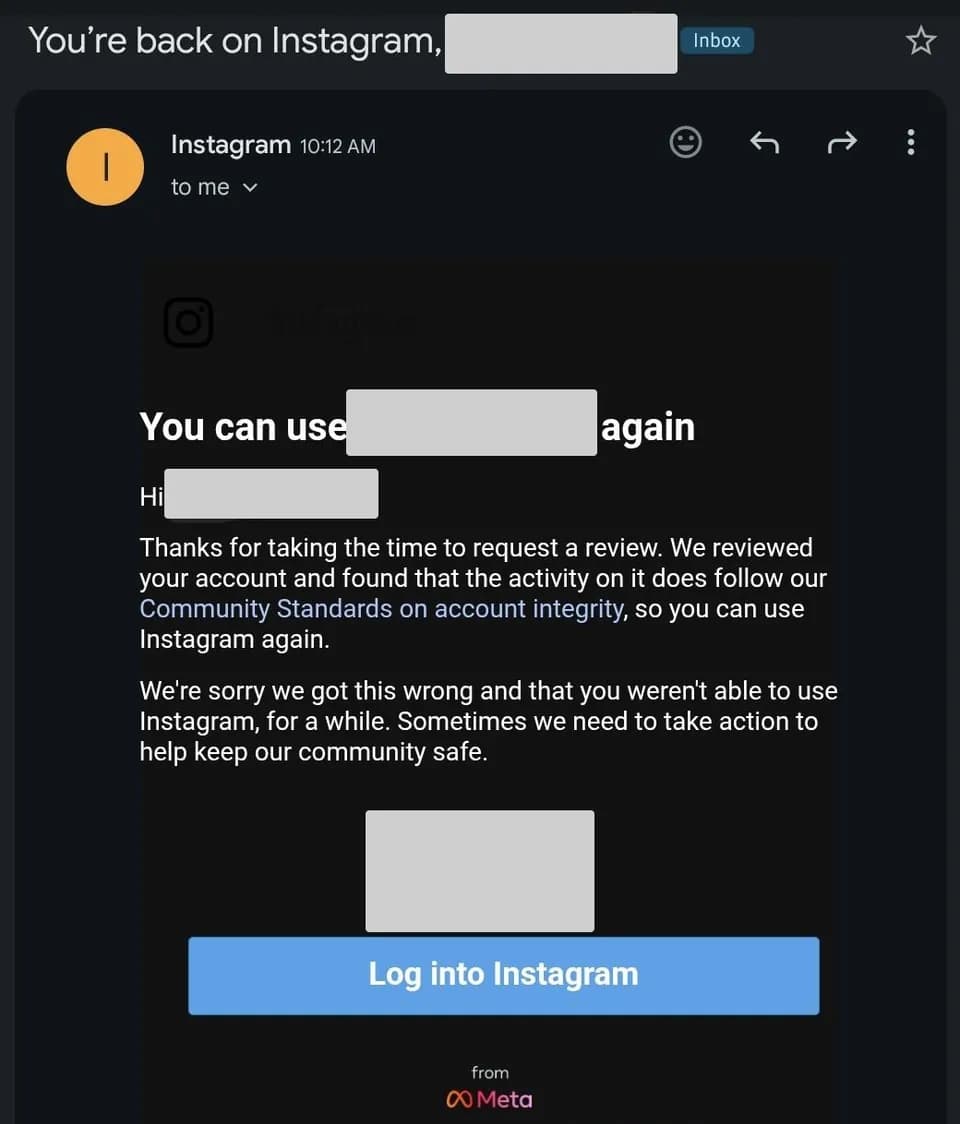
Don't wait on Instagram's email alone. People whose accounts came back report that the return is often silent, with no email at all. Trying the login now and then tells you sooner. They also report that Meta told them to change nothing on the account for a few weeks after. If the email does come, keep it: it says Instagram reviewed the account and found that the activity on it does follow the Community Standards.
Be wary of anyone who messages you offering to speed up Instagram's review, or who asks for your password or a login code. People report that Meta runs no support phone line, so treat any number that claims to be Instagram support with suspicion. Not sure whether someone got into your account or Instagram banned it? Here's how to tell a hacked account from a banned one.
Owlibi never messages anyone first, never logs in to your account, and never asks for your password, a code or ID.
What to do while you wait on an Instagram appeal
Instagram's review needs nothing more from you unless it asks. These steps keep your options open:
- Screenshot every screen and email. Note the date of the suspension, the date you appealed and the reason Instagram gave.
- Save the reference number if you live in the EU. In Instagram's decision message, "Information for people in the EU" and then "Get information" show a reference number that starts with IG-. Account Status shows it too. An outside dispute body asks for it, and the page that creates a new one needs you to log in.
- Answer any request exactly as asked. If Instagram wants a photo, follow every line of its list. A photo that misses one line holds up the review.
- Don't open a new account to get around the ban. Under Meta's rules, a new account like that is disabled as soon as Meta finds it.
- Keep the countdown in view. If your screen shows days left to appeal, put that date in your calendar. Missing it ends the review for good.
- Write down what happened. Note what you posted, which apps and devices logged in, and who else used the account. If the review says no, those facts are what comes next.
For every platform, the free guide on what to do when your account is banned has a checklist you can print.
What happens when Instagram's review says no, or never answers
Instagram's screen names two outcomes for its review: you use Instagram again, or the account is permanently disabled. It names no date by which either one arrives, and no step for an appeal that gets no response. A failed review means "you won't be able to appeal again" in the app. That ends the review in the app. It doesn't end every way to have the decision looked at again.
After the app come written routes, each with its own address and its own waiting time. Which ones apply depends on where you live and what kind of account you have. In the EU, for example, an outside dispute body can look at Instagram's decision, and Meta's rules don't make you finish the in-app review first. For the next steps after a no or a long silence, read what to do when an appeal is rejected or ignored.
Owlibi prepares every route your case allows, in order, as part of the Instagram appeal package. You send each letter yourself, and your dashboard shows what you're waiting for and until when. We don't guarantee unbans.
Not sure what's left? Tell us in the free case check. We answer by email within 24 hours with whether we take your case and what it costs. To see each step from the questionnaire to the last letter, read how Owlibi works.
If Facebook went down with your Instagram, Owlibi's page on social media account appeals shows how each app's case works.
Written by
Owlibi
Owlibi is a specialist account appeal service preparing personalised appeals, escalation letters and step-by-step guidance beyond the standard appeal process.
About Owlibi